Chrome is the first thing that comes to my mind when thinking of browsers. There is a big chance that you will be reading this article on Chrome. The browser is already a great browser but there are some Chrome flags which can enhance your experience with material design on Chrome. For those, who don't know that what actually Chrome flags are? This is the place of experimental features of Chrome which are still in development or can be used to enable or disable some features. You can see the Chrome flags by typing chrome://flags in Chrome. Don't think that the design of Chrome will completely change from every corner. There will be some elements and pages where you will see the changes. There is a probability that not even all of them work. Let's move on to the main topic without any further due. Here's the list of all of those flags. Material Design Google's work on pushing material design to all of its products is still not complete and can be noticed...
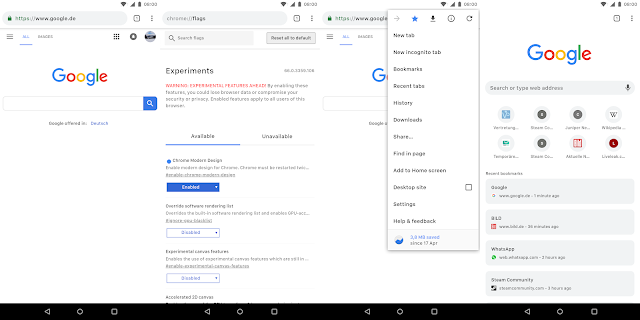
Material design is slowly getting its very version which we enthusiasts are calling the Material Design 2.0. It is a refreshed version of material design on which Google is still working. But the thing is that you can get this new design on your Chrome browser browser, both on your phone and PC. Luckily, you don't need any beta or canary version, just the latest stable version of chrome. Let's get into the steps right now! On your smartphone. Open chrome and type in chrome://flags and search there for modern design and enable the first flag you encounter. chrome://flags#enable-chrome-modern-design You may paste the given for it to work. And this is what it's gonna look like. On your PC.. Just open this link and change it from default to refresh or touchable if you are using a touch screen moniter: #top-chrome-md Just relaunch Chrome now and you are done. Here's how this one is going to look like after enabling the flag. Hop...
There are a ton of websites over the internet and as of that, it is quite difficult to find out the one which you need. I have find out some amazing ones (you may call them a time pass or fun, whatever) from the huge clutter of internet. So, let's dive right into it. This video is to demonstrate the use of these websites.You should watch that first before trying them out. Now that you have watched the video, here is the list of 5 cool websites you should try out now and enjoy. Links of the websites mention in the video- 1. Kick Ass www.kickassapp.com 2. YouTube TV www.youtube.com/tv 3. Web Archive www.archive.org 4. Flip Text www.fliptext.org 5. Cost of Living www.numbeo.com/cost-of-living/ Hope you guys enjoy the video, this was all from my side. Subscribe if want more amazing stuff upcoming soon!
Page and Brin originally nicknamed their new search engine "BackRub", because the system checked backlinks to estimate the importance of a site. Eventually they changed the name to Google, originating from a misspelling of the word " googol ", the number one followed by one hundred zeros, which was picked to signify that the search engine was intended to provide large quantities of information.
Take a very successful product and upgrade it to 4K. That's the new Chromecast for you. It still looks like an ice hockey puck and plugs int your TV - but now streams faster and in Ultra HD. Oh, and it costs twice as much as the previous generation. I just love the design of the Chromecast Ultra. But it does not matter, price matters. The price is $69 and this great device will be available in November for you. If you want to know more, go to the website of Chromecast Ultra .




Comments
Post a Comment