Posts

Showing posts with the label Android

Here !s when Google is going to release the Google Pixel 3

Image
An alleged marketing campaign page on Google's own Famebit platform suggests that the company might unveil the highly anticipated Pixel 3 pair on October 4, 2018. Screenshots of the multi-page listing obtained by the folks over at Android Police, which is for Canadian creators only, states that 'The Pixel 3 Phone is launching October 4th, 2018. Looking for Canadian creators. The listing page also adds that creators and influencers will have to use the Pixel 3 and then share their experience of using the device with their audience upon its official announcement on October 4th, 2018. Google too is going great on the game of leaking off their smartphone details as much as they can with Samsung. Follow me on Youtube  for more coverage on great things (only). :) Also Read: Samsung leaked the Galaxy Note 9 Official Teaser..
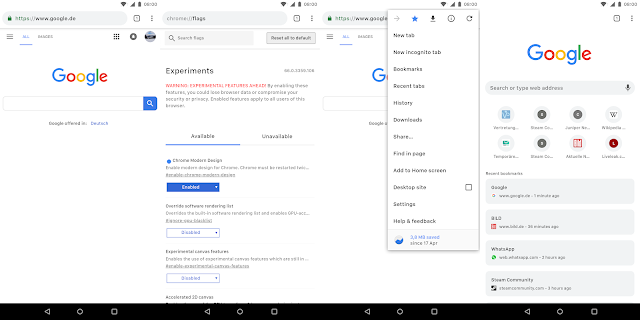
Get Material Design 2.0 on Google Chrome Right Now!

Image
Material design is slowly getting its very version which we enthusiasts are calling the Material Design 2.0.  It is a refreshed version of material design on which Google is still working. But the thing is that you can get this new design on your Chrome browser browser, both on your phone and PC. Luckily, you don't need any beta or canary version, just the latest stable version of chrome. Let's get into the steps right now! On your smartphone. Open chrome and type in chrome://flags and search there for modern design and enable the first flag you encounter. chrome://flags#enable-chrome-modern-design You may paste the given for it to work. And this is what it's gonna look like. On your PC.. Just open this link and change it from default to refresh or touchable if you are using a touch screen moniter: #top-chrome-md Just relaunch Chrome now and you are done. Here's how this one is going to look like after enabling the flag. Hop...

Making My Own Android Wallpaper!

Image
The Android lovers like me love different wallpapers on their phones every time now and then. But what, if you wnat to your own wallpaper for reasons like having your name or photo , whatever you want. This is where we comes in. Trust me guys, this way is really easy and time-saving if you can't use softwares like Photoshop or maybe don't know how to use them. I am using Canva, an online design making software which can be used for not only making wallpapers but tons of other things with great attractive templates. You can take a look in the video what I am doing and how easy it is..... You can suggest another videos that you want me to make in the comments section below. Hope you guys enjoy the stuff and keep on watching! Subscribe Here You May Also Li ke- 5 Most Weird Apps that Shamefully Exist on the Play Store! 5 Cool Websites You Should Visit! Keep on watching!

Get the transparent quick settings of Android 8.1 in your smartphone! Here's how to?

Image
                  It has been a few days since the release of Android 8.1 Developer Preview which packed with some new major changes which you can check out by clicking here . One of the most obvious change if the new transparent quick settings. And the good thing is that you can get it on your smartphone without updating to the developer preview or any root. What you will need is the same app we talked about some days before i.e. Material Design Notification Shade by which can get the Oreo notification shade with features like snoozing notifications. Now, the app has been updated so that you can get the transparent quick settings just like in Android 8.1. If you want to give it a try, your can download it from the link below and give it access to the permissions it is asking for. That's it guys, see you in the next one. Material Notification Shade - Android Apps in Google Play Also Read: Confirmed: MIUI 9 Stable ROM releasing...

The Top 10 Android 8.1 Features Everyone Need To Know!

Image
After several days of release of Android 8.1 developer preview, many new features have been found and the the list is too long. However, there are almost UI changes and improvements rather than new features. So, here are the top 10 of all those new things. This writing is by Rachit Agarwal of Beebom . Here it is without any further due. 1. Automatic Light and Dark Themes Probably my favourite feature that is coming with the new 8.1 update is the support for automatic light and dark theme. The feature was launched with Pixel 2 which automatically changed the theme on the device depending on the type of wallpaper someone is using. For example, if you are using a light wallpaper, your phone will display the light theme, but if you change to a dark wallpaper, the theme also will automatically switch to a dark mode. I think the below pictures explain this better than my words can. If you love dark mode, you are going to love this update. 2. Battery Levels For Bluetooth Connec...

Hey Indians! Get Nova Launcher Prime just for Rs. 10 ($ 0.15) (LIMITED PERIOD DIWALI OFFER)

Image
Nova Launcher is great because of its capability of customizing at a great level. However, some it's feature are locked in the prime version which is 150 rupees of cost. So, not everyone can think of buying it. But now, for a limited period, TeslaCoil is offering it just for Rs. 10. Unfortunately (not for me), this offer is only limited to Indians as Diwali sale. This offer is for a limited period so if you are thinking to buy the Prime version, you should hurry as the offer can end anytime soon. Here's the link for Nova Launcher Prime- Nova Launcher Prime - Limited Time Diwali Sale

Poll Time #4: Which is the best Android Skin according to you?

Image
There are a ton of companies out there using heavy Android skins over Stock Android. Each of them has their own pros and cons and everyone has their own likes and dislikes about them. And so, I thought, why shouldn't we do a poll and ask people that really, which is the best. So, go ahead and vote for your most favourite Android Skin! Which is the best Android Skin according to you? Samsung Experience UI Xiaomi MIUI LG UX HTC Sense Sony Xperia UI Huawei EMUI No, Stock Android is the best! Any Other (Comment Down Below)

Google Ultra Pixel: Will it be the 'One More Thing' by Google?

Image
Just about a day ago, Arun of Mrwhosetheboss YouTube Channel uploaded a video in which he claims that from some anonymous source, he had came to see Google's next Pixel generation. And  actually, it is not the Pixel 2, it's the Ultra Pixel . He is not even himself sure about the leaks he had seen. To actually know what happened, here's the video for you to watch. As now you have watched the video, let's talk about it. What I have to say about it is that I really have no idea is it true or somebody is just wasting our time. If we see it from other angle, this actually makes sense as competitor for the iPhone X. Firstly, Arun shows us a slide which has the phone itself with written 'Google Ultra pixel... Phone by Google' . So, I didn't noticed but Android Police did. As you can see Pixel here is written in small case which will not be wanted by Google to do so as Pixel is also brand. He also shows a slide written ' The future of Andr...

Poll Time #3: Which Android version are you running on your smartphone?

Image
It has been about a month since the release of the latest and greatest version of Android, Android Oreo. But if talk about Nougat, it has just passed KitKat to become the third-most distributed version of Android according to the Android Distribution Numbers . I had not get the Oreo update yet on my phone. I just wanted to know what version of Android are you running on your device so that we can get a good idea of the Android distribution. So, go and vote for your version! Which Android version are you running on your smartphone? Oreo 8.0.0 Nougat 7.0/7.1 Marshmallow 6.0 Lollipop 5.0/5.1 KitKat 4.4 EVEN BELOW!!! (Comment down below)

Is this really a teaser for Pixel 2 launch event?

Image
    Google just uploaded a video on YouTube with a title "Funny you should ask..." That 36 seconds is for sure from my side is the first teaser for the event where the Google Pixel 2 launch. The video shows many things that many people's phone can't do. And that all things which Google mentioned are again for sure the things that the Pixel 2 will be able to do. There's noting much in the video to tell you right now. But you can watch this given above and share me you your thought by commenting down below.

The Modified Pixel Launcher APK by AmirZ hits v2.1 and brings Oreo features and a lot more

Image
Did you remember my post about a new Pixel Launcher APK which comes with the Google Now Pane, Search Bar Animation and more! That modified Pixel Launcher APK by a developer AmirZ is now on v2.1 and has brought a ton of new features to play with. Yes, you can download the APK too from the link given down below. Now, let's talk about what's new! So here comes all the new features and changes: You can now pull down from anywhere on the home screen for notifications. Notification Dots can be used on Marshmallow version. Pressing the date widget alongside the 'G' pill opens your default calendar app. You can now pinch to overview.  Filter Google Now Launcher from the apps list. These were the common changes and new features noticed by me. You can have a full list of changes from the link for APK download. Rootless Pixel Launcher 2.1 Also Read: A New Pixel Launcher APK comes with the Google Now Pane, Search Bar Animation and more!

This is really what we wanted: Oreo!

Image
Android 8.0 is finally after our wait and developer previews for months is now officially Android Oreo. I know this late but this is because of the time difference in India and America. This is really wonderful... the Nexus 5X, Nexus 6P, Nexus Player, Pixel C, Pixel, and Pixel XL have already starting getting the updates. If you don't know here are the best features and improvements of Android Oreo update. The New Settings UI Google has changed the whole settings with a white-type of look. They have removed the hamburger menu, which they added to the settings in Android Nougat. Now, there are less number of tabs and many settings have been shifted. Snoozing Notifications Yes, you read it right, you can now snooze your notifications for 15, 30 or 60 minutes and they will arrive again after the time overs. Quick Settings This not a big deal but the tiles in the quick settings can now only be expanded by clicking on the text below the icon, not that ico...

Poll Time #2 : Which is your most favourite Android O feature?

Image
It is just one day for us to see the next new Android version i.e., 8.0. Also, tomorrow we will finally have the name for it. Google has given us some very cool and helpful features with this update. Everyone liked these features and beta testers for Android O are already having very fun using these features. I want to know what's your most favourite feature in this major update to Android. I know you like more than one but you can only vote for one of the options. Have fun! Which is your most favourite Android O feature? The New Settings UI New Quick Settings UI Picture-in-Picture Mode Adaptive Icons Notification Dots Smart Text Selection Updated Autofill Notification Channels Other (Comment Below)

Android O releasing on this 21st, very much confirmed that it will be Android Oreo

Image
Google has just confirmed that Android O will be releasing on August 21st with post  on Android. The post also has some info on the solar eclipse happening that day. It will be live streamed from New York starting at 2:40 P.M. ET. There are only two days left according to that which means our wait is nearly over. But there's one more big thing to tell. In a video teaser, posted on Google+ via Google themselves for Android O has file name 'GoogleOreo_Teaser_0817_noDroids (1).mp4' which states that it is going to be Android Oreo.  The story of this situation doesn't stopped here. Because of getting so much attention to that file name it was then renamed to 'OctopusTeaser.mp4'.  My mind says that someone by mistake gave the file name to oreo. And after getting the knowledge of the whole happening, it was changed to octopus. I think it can be also some sort of game by Google to make us feel confused.  But we can do only one thing till 21st, wait...

Just Think... Will Android O be really Android Octopus???

Image
Google released the fourth developer preview of Android O a few days ago with some minor tweaks and changes. But there was also one which has kept everyone in confusion. The DP4 of Android O came with a new easter egg which shows an Octopus on clicking the traditional O logo and then holding it. The question arises that will Google really change the name scheme of Android from bakery sweets to animals? There are many people out saying yes for this. As the word octopus starts from O. Also an octopus has 8 legs which shows the Android version 8.0. Is this just a co-incidence or the same is happening what you are thinking? I don't think so. I still believe it is going to be called Android Oreo. If you notice, many other have already noticed, that the head of the octopus given in the easter egg looks like an Oreo. See that black biscuit with white cream filled inside. Isn't it? I think Google is having making us fool☺☺☺? What are your thoughts? Do you think abou...

Poll Time: Which keyboard app are you using right now on your phone?

Image
There are many cool keyboards out there right now. But everyone have their own choice. To know about the best keyboard, we are having a poll for you. You can tell us your favourite   keyboard by voting down below. Which keyboard app are you using right now on your phone? (You can have more than one answer) G-Board SwiftKey Flesky Go Keyboard Any Other (Comment Below)