Posts

8 Google Search Tips in 4 MIN!

Image
Google is a powerful search engine with various tricks tricks of its own which never come into play by average internet user. So here are 8 Google Search Tips to increase your searching capabilities to a great extent. Video Walkthrough: 1. Searching throughout a specific site 2. Eliminating specific results 3. Leaving space in queries 4. Finding a specific type of file (EXAMPLE- .pdf, .docx) 5.  Recent Earthquakes 6. Related websites 7. Different Results at the same time 8. *MINI EASTER EGG* You can suggest another videos that you want me to make in the comments section below. Hope you guys enjoy the stuff! Keep on watching!

Here !s when Google is going to release the Google Pixel 3

Image
An alleged marketing campaign page on Google's own Famebit platform suggests that the company might unveil the highly anticipated Pixel 3 pair on October 4, 2018. Screenshots of the multi-page listing obtained by the folks over at Android Police, which is for Canadian creators only, states that 'The Pixel 3 Phone is launching October 4th, 2018. Looking for Canadian creators. The listing page also adds that creators and influencers will have to use the Pixel 3 and then share their experience of using the device with their audience upon its official announcement on October 4th, 2018. Google too is going great on the game of leaking off their smartphone details as much as they can with Samsung. Follow me on Youtube  for more coverage on great things (only). :) Also Read: Samsung leaked the Galaxy Note 9 Official Teaser..

Samsung leaked the Galaxy Note 9 Official Teaser..

Image
Samsung should now itself be given a sticker of a 'leakster' as Samsung has yet leaked the official teaser of their upcoming flagship smartphone, the Samsung Galaxy Note 9. It was mistakenly uploaded by the Samsung New Zealand YouTube channel. This is a 30 second teaser video and you can have a better look on it here.. This will be bad for those who are gonna attend the official launch event as everything is already in spotlight about the phone. Comment your suggestions on Samsung continuously leaking their smartphones themselves (Galaxy S9 last time). Also Read: Get Material Design 2.0 on Google Chrome Right Now!

Get Material Design 2.0 on Google Chrome Right Now!

Image
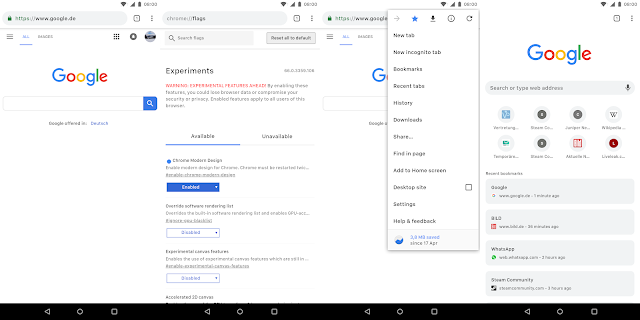
Material design is slowly getting its very version which we enthusiasts are calling the Material Design 2.0.  It is a refreshed version of material design on which Google is still working. But the thing is that you can get this new design on your Chrome browser browser, both on your phone and PC. Luckily, you don't need any beta or canary version, just the latest stable version of chrome. Let's get into the steps right now! On your smartphone. Open chrome and type in chrome://flags and search there for modern design and enable the first flag you encounter. chrome://flags#enable-chrome-modern-design You may paste the given for it to work. And this is what it's gonna look like. On your PC.. Just open this link and change it from default to refresh or touchable if you are using a touch screen moniter: #top-chrome-md Just relaunch Chrome now and you are done. Here's how this one is going to look like after enabling the flag. Hop...

Making My Own Android Wallpaper!

Image
The Android lovers like me love different wallpapers on their phones every time now and then. But what, if you wnat to your own wallpaper for reasons like having your name or photo , whatever you want. This is where we comes in. Trust me guys, this way is really easy and time-saving if you can't use softwares like Photoshop or maybe don't know how to use them. I am using Canva, an online design making software which can be used for not only making wallpapers but tons of other things with great attractive templates. You can take a look in the video what I am doing and how easy it is..... You can suggest another videos that you want me to make in the comments section below. Hope you guys enjoy the stuff and keep on watching! Subscribe Here You May Also Li ke- 5 Most Weird Apps that Shamefully Exist on the Play Store! 5 Cool Websites You Should Visit! Keep on watching!

5 Most Weird Apps That Shamefully Exist on the Play Store!

Image
There are apps both on App Store and Play Store of Android that are super and awesome crossing the limits of perfection. But most of the store is filled with some waste that is so useless and weird that it should be talked about. So here I am going to showcase the top 5 most weird apps you can find on the Play Store. And trust me, they cross the limits of craziness and weirdness. Here is the list and the links to all those apps I mentioned in the video above so that you can check them out. 1. I Am Rich https://play.google.com/store/apps/details?id=mobile.com.imrich 2. Nothing https://play.google.com/store/apps/details?id=my.app.does.nothing      Nothing Pro https://play.google.com/store/apps/details?id=my.app.does.nothing.donate 3. Hold On https://play.google.com/store/apps/details?id=se.webbdudes.apps.holdon 4. Useless https://play.google.com/store/apps/details?id=balsdon.com.useless 5. What I Was In My Past Life https...

5 Cool Websites You Should Try Now!

Image
There are a ton of websites over the internet and as of that, it is quite difficult to find out the one which you need. I have find out some amazing ones (you may call them a time pass or fun, whatever) from the huge clutter of internet. So, let's dive right into it. This video is to demonstrate the use of these websites.You should watch that first before trying them out. Now that you have watched the video, here is the list of 5 cool websites you should try out now and enjoy. Links of the websites mention in the video- 1. Kick Ass www.kickassapp.com 2. YouTube TV www.youtube.com/tv 3. Web Archive www.archive.org 4. Flip Text www.fliptext.org 5. Cost of Living www.numbeo.com/cost-of-living/ Hope you guys enjoy the video, this was all from my side. Subscribe if want more amazing stuff upcoming soon!

14 MIUI Tricks Every Xiaomi Smartphone User Should Know!

Image
MIUI has a lot to offer whenit comes to features and stuff useful in everyday usage of your smartphone. There are some minor and interesting tweaks and features in this custom ROM that are pretty useful and should be known by every Xiaomi Smartphone user. Hope you guys enjoy the stuff I am uploading and providing.  Thumbs up if you are interested in more videos like that.   There are 14 tips/tricks provided int his video, respectively, 1. Notification Icons 2.  App Locking in background 3.  Phone as a remote for everyone 4.  Unimportant Notifications 5. Forced Multitasking 6. Pinch for layout options 7. Gestures 8.  Phone Info 9. Developer Options 10. Swipe anywhere for notifications 11. Scheduled Power Off 12. Gesture Rotation 13. Tap on lockscreen for article related to wallpaper 14. iPhone like Gesture Control

Here is the offical trailer of the Samsung Galaxy S9!

Image
The company has leaked the offical trailer of the Galaxy S9, their upcoming flagship before the official announcement at MWC 2018 at Barcelona. Here is the trailer for you to take a look. By the way, here is the complete trailer without any editing. For me, there's nothing much exiting here and I don't also think at all that this to be a worthy upgrade if you are already a Galaxy S8 or Note 8 owner. #CareFreeSamsung Subscribe for more amazing stuff coming ahead... ✌️✌️

Best Apps to Try In February 2018!

Image
A lots of apps are uploaded onto the Play Store every other minute, so it makes difficult for the users to choose from and a lot of great apps are left behind. Today, you are gonna take look at some of them you should not miss! 1. Motion Stills https://play.google.com/store/apps/de... 2. Gravity Gestures https://play.google.com/store/apps/de... 3. Face App https://play.google.com/store/apps/de... 4. Google Opinion Rewards https://play.google.com/store/apps/de... 5. Socratic https://play.google.com/store/apps/de...   Subscribe for more amazing stuff to come ahead!  Hope you guys will enjoy.

Poll Time #6 : How much GB internet do you use in a typical month?

Image
We all use internet all the time, all the day. But everyone uses it his/her own way and so, everyone's monthly use of varies very much. A guy who watches movies only may have a much bigger bill than one who just loves reading articles all the time. One may lie in between who is a music lover (like me) or may be doing all these things I mentioned. So, how much GB internet you end up using at the end month. And.... if you are thinking about mine, it may be around 20-30 GB. But definately there will be users having much more than mine. What are you thinking now, tick the one you think is the most appropriate according to your usage.  This was Akshat and that was from my side. The turn is yours... Go!!!   How much GB internet do you use in a typical month? Less than a GB 1-10 GB 10-20 GB 20-30 GB 30-40 GB 40-50 GB Even more than 50 GB! (That is too much)

A Very-Very Happy New Year to All You Guys!

Image
Wishing You All...Great, Prosperous, Blissful, Healthy, Bright, Delightful, Mind Blowing, Energetic, Terrific & Extremely HAPPY NEW YEAR 2018. Let's pray it will be a year with New Peace, New Happiness and abundance of new friends. Cherish each moment and Celebrate the blissful New Year. May all your dreams come true. AKSHAT GUPTA ... Yeah, I know that thumbnail above absolutely looks over dramatic... and I'm not sorry for that!

Get Heavy Discount on Nova Launcher Prime in this holiday season!

Image
Nova Launcher is great because of its capability of customizing at a great level. However, some it's feature are locked in the prime version which is $5 of cost. So, not everyone can think of buying it. But now, for a limited period, TeslaCoil is offering it just for just a dollar. In India, it is showing it for as low as RS. 10. For now, no time has been specified when will it end. This offer is for a limited period so if you are thinking to buy the Prime version, you should hurry as the offer can end anytime soon. Here's the link for Nova Launcher Prime- Nova Launcher Prime Sale Also Read: How to save WhatsApp Status images and videos without taking screenshots???

How to save WhatsApp Status images and videos without taking screenshots???

Image
WhatsApp status feature has covered a long way and people are actually loving using it. If you love making WhatsApp status and even love to see what others have posted in their statuses just like my bua...emmm.. it is the Hindi word for aunt.., there will be situations many-a-times when you want to save the photo posted in someone's status but you just leave taking a screenshot of that. But fortunately, there's a much-much better way to do the same. If you wanna know how, keep reading as today, we are going to talk about the same. 1. So, first of all, you will need any file explorer with the functionality to show hidden files. For instance, we are using ES File Explorer which is actually, one of the most ones. 2. Ok, open WhatsApp and have a look at the status you want to save. It can be both either a photo or a video. 3. Now, open ES File Explorer. Go to Local > WhatsApp > Media. 4. From the sidebar now, you will have to activate the 'Show Hidden...

A Mystery Device Mock-Up Showed on The Google Store! Our First look at the next gen Pixel??

Image
Google Pixel 2 XL may be Google's first try towards a bezel less smartphone but still that phone too has some annoying bezels. To match up the levels of Xiaomi Mi Mix 2 and iPhone X, Google may be working on a truly bezel less smartphone. Yes, few days ago, a image was found in Google Store which you can see above which certainly is not having any type of bottom bezel in my opinion. Things even got fired up when the image was removed from there. I mean why remove it if it is just a render? This clearly arises many questions about the next gen of Pixel smartphones lineup. While they are a thing which will be happening in October 2018 and it is very early to talk about that, Google working on a device such early to achieve the level of greatness is awesome. ''Google working on a device such early to achieve the level of greatness is awesome.'' You can have a look at the Google Pixel 2 XL if you are interested. Subscribe and be updated with all ...

All the YouTube Shortcut Keys that you don't even know about!

Image
S hortcut keys are pleasure to have actually don't want to lift your hand to the mouse for certain actions. But what if you are watching a YouTube video. Many of you will probably don't know YouTube too has many really useful shortcuts within if you don't wanna stop or disturb you video watching experience. And here are all of them just in case you need them anytime. 1. Toggle play/pause the video ⇨  k or Spacebar 2. Go back 5 seconds ⇨  Left arrow 3. Go back 10 seconds ⇨  j 4. Go forward 5 seconds  ⇨  Right arrow 5. Go forward 10 seconds ⇨  l 6. Skip to a particular section of the video ⇨  (e.g., 5 goes to the video midpoint) Numbers 1-9 (not the keypad numbers) Restart video ⇨  0 (not the keypad number) Go to Full Screen mode ⇨  f Exit Full Screen mode  ⇨  Escape Go to beginning of video ⇨  Home Go to end of video ⇨  End Increase volume 5% ⇨  Up arrow Decrease volume 5% ⇨...

Just Think... Has OnePlus really did it correct by making OnePlus 5 OLD???

Image
With the release of OnePlus 5T, the company's latest and greatest flagship just right around the price of OnePlus and even keeping it the same in countries like India, everyone is treating and greeting it as a 'flagship killer, 'a must buy' or whatever. But just think, has OnePlus really did it correctly. I am talking of those who brought the OnePlus 5 just a few months ago. As of now, their device is just an older version or model of the country. The gap between the release of OnePlus 5 and the 5T is around 5 months only which will be approx. 150 days. Is this new T even really new? OnePlus 5 and 5T are both a great device but the 5 lacks many of those small things and gaps which have been now filled up by the 5T. But for me, that's not good if you released the previous model of your smartphone series just between the gap of a number of days. Those who brought the OnePlus 5 would be probably thinking if they could think of a wait for a few months at t...

Google's Santa Tracker app is here again with the 2017 update! And now it supports Android TV

Image
You know it's getting to be that time of year when Google updates the Santa Tracker app. Yes, the app has gotten its 2017 makeover so you can follow Saint Nick on his totally real journey across the globe. While the app is called "Santa Tracker," there's very little tracking to be done. That part of the app doesn't unlock until December 24th, but in the meantime you can play some mini-games and watch videos. However, not all the videos are unlocked yet. There's one available right now, with another coming on December 15th and one more on the 23rd. There will also be new games added on a regular basis. This year's update includes new content (the games and videos) as well as support for Android TV. You can download it directly from the link given here. Google Santa Tracker - Android Apps on Google Play Also Read: How you can make your own 3D Hologram for free? DIY!!!

How you can make your own 3D Hologram for free? DIY!!!

Image
After long, here I am back in front of you, and today we are gonna talk about how to make your very own hologram with the use of some things you can find at your home. So, without any waste of time, first of all here are all the things you will need in order to complete it. Graph Paper Pencil CD Case or similar transparent plastic Scissors Glass cutter or Knife  Scale Transparent tape out super glue And... Your smartphone After having all these things, follow the given steps- 1.Take the graph paper and draw a trapezium with one side of 1 cm and height of about 3.5 cm and base of 6 cm in such a way that it can look like this. 2. Take the CD case and remove the sides to let it be completely plane. 3.Cut out the trapezium and paste it on that CD case. 4. Cut 4 pieces of the trapezium from the case. 5. Paste them such a way with tape or super glue that they look like this... 6. You are done with the work now. Here are some videos in this playlist ...

OnePlus 5T : Each and everything at one place!!!

Image
The next new flagship from OnePlus is just a few days ahead with the official announcement on November 16th. And as we all know that it's 2017 and every new phone leaks, so of that, the OnePlus 5T has also been leaked with almost everything that we are going to hear at the launching event. So for the enthusiasts, so that they don't have to visit site to site, here's everything you need to know about the leaked OnePlus 5T in a a summarized way.. Let's start the amazing topic without any further due. Display OK, this may be the headlining feature of OnePlus 5T. As the OnePlus 5 had bezels even in 2017, the company may have decided to follow the trend of a larger screen with reduced bezels. Also, it will still be a full HD 1080p display rather than quad HD 1440p but in a 18:9 aspect ratio. Design The design will be remain inspired from OnePlus 5 but with some minor improvements. First of all, because of the reduced bezels, the fingerprint reader can not b...