Posts

WhatsApp is now testing a new option to pin your most important chats on the top.

Image
WhatsApp recently gave us a new conversational UI in its app. Now a new option is appearing on selecting​ a chat to pin it at the top. This will be going to very helpful for those who want their important chats firstly rather than other annoying chats. This feature can be used on WhatsApp 2.17.162 or above. You should also know that only up to 3 chats can be pinned at the top right now. My knowledge says that this number will absolutely increase very soon. Wait to get this on your phone. Otherwise you can download the beta version and try it right now with other cool new features. Continue reading my blogs with these new updates regularly given to you.
A Quick Look at The 10 Cool New Features inside Android O Developer Preview

Image
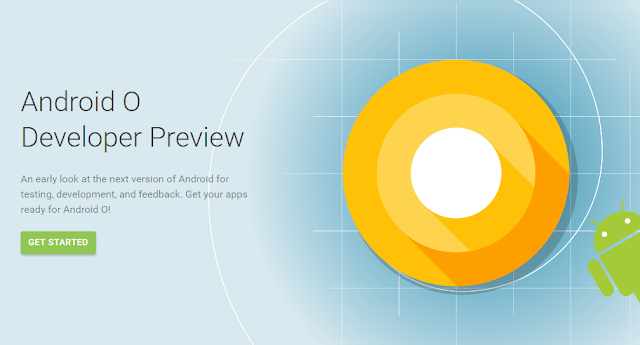
Android O was made out a few days ago as it's first developer preview. Many people wants to know that what is new there. For those, I am going to tell the 10 most noticeable features in Android O. So, let's get started.  The New Settings UI Google has changed the whole settings with a white-type of look. They have removed the hamburger menu, which they added to the settings in Android Nougat. Now, there are less number of tabs and many settings have been shifted. Notifications Badges This is what, users were asking from many time. Finally, they are now live in the Android O Developer Preview. Snoozing Notifications Yes, you read it right, you can now snooze your notifications for 15, 30 or 60 minutes and they will arrive again after the time overs. Quick Settings This not a big deal but the tiles in the quick settings can now only be expanded by clicking on the text below the icon, not that icon. Custom Lock Screen Shortcuts You have se...

Read about Best Tech News and Gadgets in a New Way

Image
Hey friends, I welcome you to my website which is now having a fresh new look and UI . Keep reading and subscribing to my blogs for more great news and tricks.

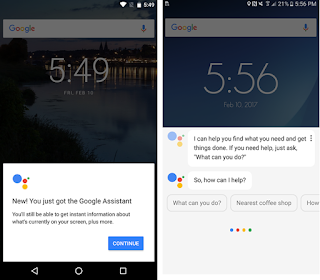
I got The Google Assistant, this is time to tell you how? No roots, no third-party apps.

Image
Yesterday, I got the Google Assistant which was said to be distributed on all the android devices with version 6.0 or later. But in a poll by a website, it was seen that there are only 21% people who voted for the poll were having the Google Assistant. The reason before it could be that it is only available for some certain languages. But today, I am going to show you how you can get this assistant on your device with work of only a few minutes. OK, now the process I am going to tell you worked for me: Requirements 1. Android 6.0 or above. 2. A minimum of 1.5 GB RAM. 3. Google app - 6.13.25.21.arm or above. 4. Google Play Services - 10.2.98 or above. Process 1. Get into your settings and change your device language to English (US). This can be changed in the 'Language and Input' option. 2. Now move to Google Settings and change the app's language also to English (US). 3. Clear all the data created by the Google app in the settings. 4. You...

WhatsApp Latest Beta v2.17.93 comebacks with The 'Old Status' named 'About' with A New Conversation UI

Image
Yes, this is what every WhatsApp user is waiting for which eagerly. The Old Status is back, now named 'About'. But yeah, the new Status is also there too.  This latest beta version of WhatsApp is also containing something new. The Conversation UI has changed with attachment button just down below in the messaging box. The Camera buuton is also new. And you know what? This really makes sense that all things whick can be attached and sent to other user are now together. The empty space above has been filled with the Video Calling button. Now, the voice and video calling buttons are seperately lying on the top as you can see above. If you want, you can use these features right now by downloading the APK file given below but keep in mind that this is the beta version.  WhatsApp 2.17.93 Beta

Google V6.13 beta is showing Google Assistant for some devices

Image
Many apps and websites recently are saying that the Google Assistant will go on to more devices. Now, it's going true. Google v6.13 is showing Google Assistant on holding the home screen in some devices. Unfortunately, the assistant is not shown in my device. But there are a number of good new features in the new update. Let's talk about that. Google Assistant As I said above, I am not the who seen that Google Assistant on his device. But it can be after some time when this update will roll out officially for everybody. Some of the users of Android Police has seen working the Google Assistant on their non-Pixel devices like Nexus 6P. Lite Mode The already suggests that it for low connectivity or slow speed internet. Lite Mode is useful when your internet is too much slow to use. Search Region I think this update was already added in the earlier version but I saw it for the first time so I am writing about that too. This can be useful for th...

Play Store v7.4 shows A New Way to get Review of an App

Image
Google with Play Store has always tried something new for an effective way for us to get a review of any app or game. Play Store v7.4 is showing a 'top features' column when viewing an app review. In games review, as you can see in the above photo, ratings has been divided into three parts - Gameplay, Grafics and Controls.  In apps review, top features ratings are given by its own. Also the system of rating a game has been changed. Now, you have to give it an all over rating, Gameplay rating, Controls rating and Grafics rating. These are the new changes in the Play Store v7.4 as seen by me. If you see another new features, please tell me by leaving a comment.